Phrase Ecosystem Engine integration
This page explains how to configure Companion as an Ecosystem engine in a Phrase Language AI MT profile.
Overview
Companion is available in Phrase Language AI as the RWS Companion Ecosystem engine. As the engine provider, RWS built the integration on top of the Phrase Bring Your Own (BYO) Engine API.
Companion Ecosystem Engine configuration
The following figure shows an example engine setup in Phrase:
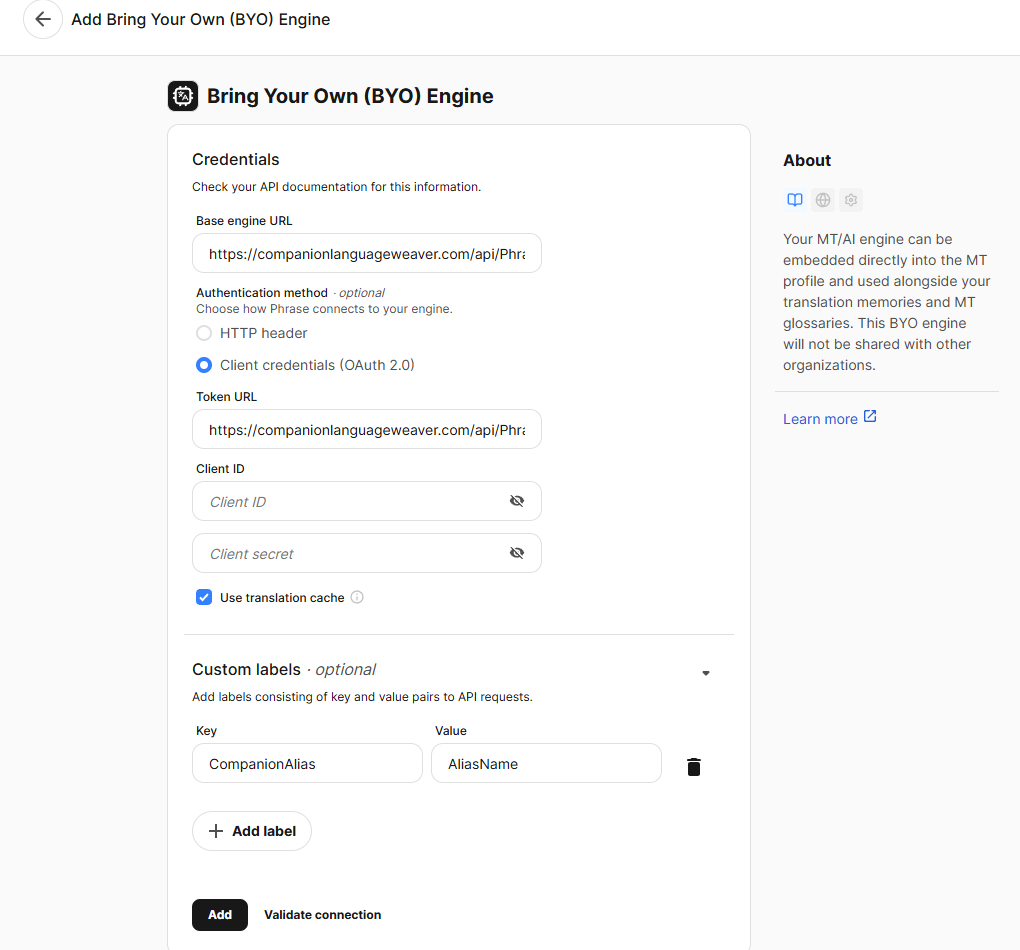
Example of Ecosystem engine setup in Phrase Language AI.
Credentials
Parameter |
Value / guidance |
|---|---|
Client ID |
Application (client) ID of the RWS Azure AD app registration provided for your tenant. |
Client secret |
Client secret of the same app registration. |
Customization
Companion consumes the following custom parameters:
Parameter |
Required |
Description |
|---|---|---|
|
Yes |
MT engine configuration alias used by Companion. |
|
No |
Comma-separated labels forwarded to Companion processing. |
Companion Labels format:
labelTaglabelName=labelValueMultiple labels are comma-separated:
label1,label2,name=value
Phrase dynamic metadata placeholders can be used in custom labels, for example
{project_uid}, {job_uid}, {idm_organization_uid}.
Migration guide
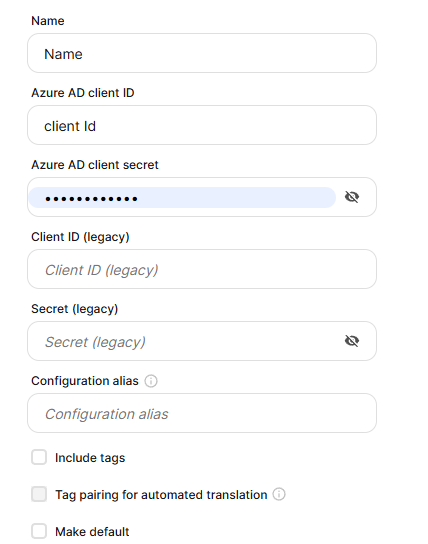
Figure: Legacy MT engine configuration (migration reference).
Use the following mapping when moving from legacy engine configuration to Phrase Language AI RWS Companion Engine.
Legacy configuration |
Ecosystem configuration |
|---|---|
|
|
|
|
|
|
Once the new configuration is ready and the connection validated, switch the legacy engine to Phrase Language AI using the Switch to PLAI button under Settings > Machine Translation Engines.
This will point all your existing projects and project templates (which were linked to the third-party MT engine) to the PLAI MT profile you chose.
Recommended MT profile setup
For full MT profile setup details, follow the Phrase Language AI guide and Ecosystem Engine guide in the references below.
To use Companion Ecosystem engine exclusively after migration:
Create a new Phrase Language AI MT profile (or update a dedicated profile for this use case).
Add the Ecosystem engine configuration for Companion.
Disable all other MT providers/engines in that profile.
This ensures translation requests routed through that profile use only the Companion Ecosystem engine.
Unsupported features
MT glossary
Phrase-side MT glossaries are not supported. Companion does not consume glossary data, even when glossaries are set up in Phrase Language AI (MT glossaries tab) and attached to the engine profile.
Glossaries can only be used natively through a particular MT provider. If your MT provider supports glossary configuration, set it up on the provider side (for example, in Language Weaver provider configuration, or in another provider-specific glossary/custom model configuration).
References
Phrase Language AI (Ecosystem engine): https://support.phrase.com/hc/en-us/articles/5709660879516-Phrase-Language-AI#ecosystem-engine-0-11
Phrase Bring Your Own Engine: https://support.phrase.com/hc/en-us/articles/28559223255836-Bring-Your-Own-Engine#UUID-8682b51d-5108-97bd-790f-ee28bf9b3ef9
Phrase dynamic metadata labels: https://developers.phrase.com/en/guides/byo-engine/introduction#dynamic-metadata
Phrase MT Glossaries: https://support.phrase.com/hc/en-us/articles/5709675486876-MT-Glossaries